



#What is Markdown?
A few marks decidethe shape of the document.
Markdown is a way of writing where marks inside the text decide its shape. A # at the start of a line makes a heading; a - makes a bullet. That is the whole idea.
Because there is so little to learn, you can stay on the writing. The file is plain text, so it opens anywhere, and it pastes straight into GitHub or most publishing sites. Documents that ChatGPT and Claude hand back are usually written this way too.
##What is Markdown?
What you type, and what you see.
On the left, the characters you type. On the right, how Monoshiri Note shows them. These two are the same place — there is no preview pane to switch to.
Headings
The number of # is the depth. More of them means a quieter colour and a smaller size. The # disappear once the cursor moves away.
What you type
# 週報
## 今週やったこと
### 見積もり
How it looks
Bullets
A - at the start of the line. Two spaces of indent nests it, and the mark changes colour per level.
What you type
- 見積もりを送った
  - 先方の確認待ち
    - 金額は据え置き
How it looks
Numbered
Start with 1.. The numbers come out as you wrote them.
What you type
1. 下書き
2. 見直し
3. 送付
How it looks
To-dos
- [ ] for an empty box, - [x] for a done one. The box is clickable.
What you type
- [x] 請求書を出す
- [ ] 打ち合わせの日程
How it looks
Emphasis
** for bold, * for italic, ~~ for a strikethrough. The **, * and ~~ disappear once the cursor moves away — they are still in the text, and come back when you put the cursor beside them.
What you type
金額は **据え置き**、条件は *要相談*、納期は ~~来週~~。
How it looks
Quote
A > at the start of the line. For someone else’s words, or a line worth coming back to.
What you type
> 最初のリリースは小さく。
How it looks
Divider
A line with just ---. For where the subject changes.
What you type
ここまで

---

ここから
How it looks

Inline code
Wrap it in `. For command names and file names.
What you type
`npm run build` を実行します。
How it looks
Code block
Fence it with lines of ```. Name the language after the fence for colour, and add a file name as js:app.js.
What you type
```js:app.js
const n = 1;
console.log(n);
```
How it looks

Links
[name](URL). Once finished, only the name remains and clicking opens it. Put the cursor beside it to edit the address again.
What you type
[請求書のひな形](https://example.com)
How it looks
Images
. Dropping an image into the editor is enough — it goes to ~/images/ and this line is written for you.
What you type

How it looks

Attachments
Drop a PDF or a spreadsheet and it lands in ~/files/ as a chip. PDFs open inside the app.
What you type
[見積書.pdf](~/files/見積書.pdf)
How it looks

Tables
Columns are split by pipes. Build one from / and type straight into the cells.
What you type
| 項目 | 状況 |
| --- | --- |
| 見積もり | 送付済み |
How it looks
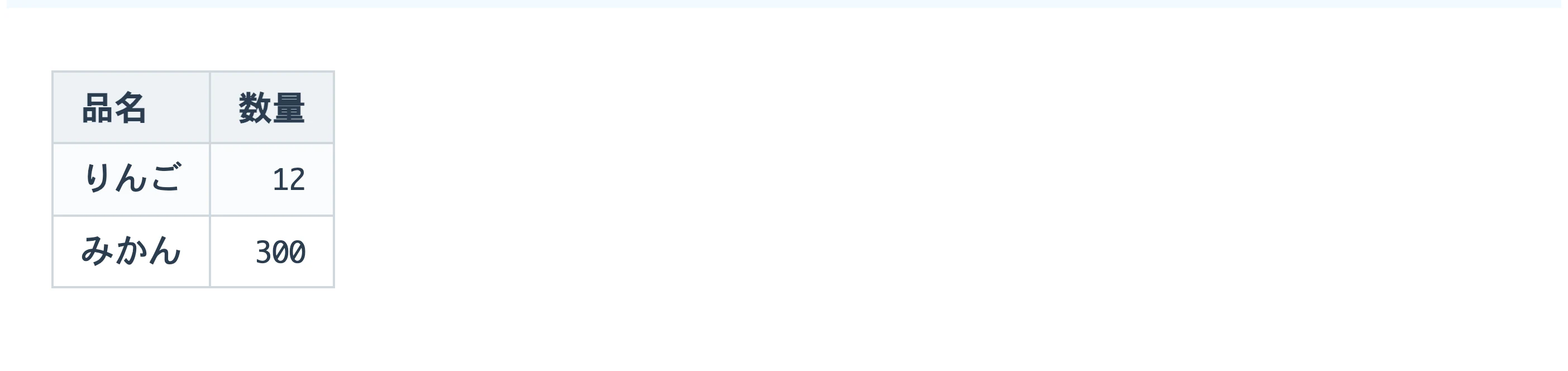
Table alignment
Add a : to the --- row. :--- is left, ---: is right, :---: is centred.
What you type
| 品名 | 数量 |
| :--- | ---: |
| りんご | 12 |
| みかん | 300 |
How it looks
Line break in a cell
A Markdown table holds one row per line, so use <br>. Shift+Enter types it for you.
What you type
| 項目 | 覚え書き |
| --- | --- |
| 見積 | 送付済み<br>要確認 |
How it looks

Folds
<details> with <summary>. Put long passages away. They fold the same way on GitHub and elsewhere.
What you type
<details>
<summary>長い話は畳んでおく</summary>

中身

</details>
How it looks

Diagrams
Fence it with ```mermaid and the diagram is drawn as written — flowcharts, sequences, pie charts.
What you type
```mermaid
graph LR
  A[下書き] --> B[見直し]
  B --> C[送付]
```
How it looks

Formulas
$ around it for inline maths, lines of $$ around it for a block.
What you type
$$
E = mc^2
$$
How it looks

Footnotes
Put [^1] in the text and [^1]: the note on its own line. Clicking either one jumps to the other.
What you type
本文に注を付ける[^1]

[^1]: ここが注の中身。
How it looks

##AI and Markdown
AI answers are written in Markdown, too.
The # and ** that show up in answers from ChatGPT, Claude and Gemini are the same Markdown marks as in the list above. The chat window turns them into headings and bold text, so you rarely notice — but copy the answer somewhere else and the marks can come through as they are.
Once you know what the marks mean, you can read an AI answer as it is, and there is no need to go round deleting them. The same way of writing helps when you ask an AI for something.
Marks you will see in AI answers
| Mark | Meaning | In an AI answer |
|---|---|---|
| # ## ### | Heading | Where the answer is split into topics. The more #, the smaller the heading. |
| **word** | Emphasis (bold) | Wrapped around key terms and conclusions. The mark you will meet most. |
| - or * | Bullet list | Where points or options are listed. It sits at the start of the line. |
| 1. 2. 3. | Numbered list | Steps, and anything where the order matters. |
| | A | B | | Table | Comparisons and lists. The |---|---| on the second line separates the header from the rows. |
| ``` | Code block | Wraps programs, commands and text meant to be copied as it is. |
| `word` | Inline code | File names, command names, key names. |
| > text | Quote | Where the original wording is quoted, or for a side note. |
| --- | Divider | A single line where the topic changes. |
Why AI answers in Markdown
Plain text can carry the shape of a document
What an AI returns is a run of characters. Markdown lets headings, lists and tables be written with characters alone.
It has been in wide use for years
READMEs, technical docs and developer sites have long been written this way. With so much of it around, it is a form an AI writes easily.
Readable even as raw marks
Even unrendered, you can see that a # line is a heading and a - line is a bullet. Nothing is lost wherever you paste it.
Paste an AI answer and this is what you get.
Below is the real editor, with Markdown from an AI pasted in as it is. The marks are not stripped — they turn into headings and tables on the spot. Paste in an answer of your own and try it.
# Moving plan

What to do before the move, by date.

## To do

- **One month** before
  - Get quotes from movers
  - Give notice on the current flat
- **One week** before
  - [x] File the change of address
  - [ ] Call power, gas and water

## Paperwork

| Task | Where | Deadline |
| --- | --- | --- |
| Notice of leaving | Current city office | From 14 days before |
| Notice of arrival | New city office | Within 14 days after |

## Flow

```mermaid
flowchart LR
  A[Quotes] --> B[Give notice]
  B --> C[Packing]
  C --> D[Moving day]
```

> As a rough guide, with $x$ for the amount of stuff and $d$ for the distance, the cost grows with $x \times d$.
Nothing is saved. What you type is gone when you leave this page.
How you ask decides what you get back.
One extra line changes the form of the output. Here are requests you can copy as they are.
Get it as Markdown
Write the answer in Markdown and put the whole thing in a single code block.
Text inside a code block copies with its marks intact. Paste it into a note and the headings and tables keep their shape.
Have things compared in a table
Summarise the differences between the three options in a Markdown table.
Easier to compare at a glance than running prose. You can retype the cells after pasting.
Have the to-dos made into a checklist
Write the to-dos as a checklist where each line starts with “- [ ]”.
- [ ] becomes a box you can click to tick off. The plan the AI wrote is now your to-do list.
Have the flow drawn as a diagram
Write the flow of these steps as a Mermaid flowchart.
Text wrapped in ```mermaid becomes a diagram when pasted. To change the diagram, just retype the text behind it.
Get maths in a form that displays
Write maths with “$” delimiters: $…$ inline, and lines of $$ around a standalone formula.
AI sometimes writes maths as \(…\) or \[…\]. Monoshiri Note typesets the form wrapped in $, so asking this way is the safe choice.
When you want text without marks
Do not use Markdown marks; write in plain prose.
If it is going straight into an email or Word, asking for no marks from the start is quicker.
Instructions for an AI land better in Markdown, too.
A long request gets across better split into headings and bullets than written as one block of prose. The basic pattern: background, what you want, constraints, and the form of the output.
# Request
Write an announcement for an in-house study session.

## Background
- For about 20 people in the sales team
- Topic: “Writing meeting notes with AI”

## Constraints
- Under 150 words
- Put the date and place first
- Keep the tone relaxed

## Output
- In Markdown
- Three subject-line options and one body
- Split it with headings and the AI is less likely to mistake background for a constraint.
- Put constraints in bullets. One per line makes it easy to see later what was missed.
- Keep the pattern as a file and next time you only swap the contents.
The .md files you meet around AI
.md marks a file written in Markdown. It is plain text, so any app can open it. In AI-assisted development you will often see files with these names.
- README.md
- The manual for a folder or project: what it is for and how to use it.
- CLAUDE.md
- Instructions for Claude Code to read: the project’s conventions and how work should be done.
- AGENTS.md
- Instructions for coding agents such as Codex. It plays the same role as CLAUDE.md.
- Plans and reports
- The designs and reports an AI writes along the way are usually
.mdas well. People read them, fix them, and hand them back.
Monoshiri Note is a place to read and fix what AI writes.
There is no need to read AI-written Markdown as a wall of marks.
- Paste and it takes shape. Headings, tables, checklists, diagrams and maths take shape the moment you paste. There is no preview to switch to.
- Fix it right there. The cells of a rendered table and the text behind a diagram can be retyped on the same screen.
- It stays a
.md. What gets saved is a plain.mdfile. You can hand it back to an AI later, or open it in another app. - Looks the same on every device. The same note opens in the same shape on Mac, Windows, iPad, iPhone and the browser.
- Opens the
.mdfiles you already have. On Mac and Windows you can open an AI-made.mdstraight from Finder or File Explorer.
Monoshiri Note itself has no AI features. You talk to the AI in the service you use; this is where you read, fix and keep the result.
Common questions about AI and Markdown
- What is the “**” in ChatGPT answers?
- It is the Markdown mark for emphasis (bold). Writing
**important**makes “important” bold. The chat window shows it as bold, but if the place you paste into does not understand Markdown, the marks appear as they are. - What are “##” and “###”?
- They mark headings. One
#is the largest heading, and more of them mean smaller headings. AI uses them to split a long answer into topics. - Why do marks appear when I copy an answer?
- The answer was written as text with marks in the first place, and the chat window turns them into shapes for display. Paste it somewhere that does not do that and you see the original marks.
- How do I stop the marks from appearing?
- Ask “Do not use Markdown marks; write in plain prose” and the answer comes back without them. If asking each time is a chore, put it in the setting each service offers for how it should respond.
- What is a .md file?
- A plain-text file written in Markdown. Any text editor opens it, but you will see the marks in a row. Open it in an app that understands Markdown and it reads as headings and tables.
- How do I open a .md file an AI made?
- It is plain text, so any text editor will do. Open it in Monoshiri Note and the headings, tables and diagrams are already in shape, and you can edit right there. On Mac and Windows, right-click the file and choose Monoshiri Note as the app to open it with. In that list it appears as “Monoshiri” on Mac and “Markdown Editor - Monoshiri” on Windows.
##Related
- What a .md file is, and how to open it The .md extension marks a plain-text file written in Markdown. What a .md file is, how to open it on Windows, Mac, iPhone, iPad or in a browser, what to do when it will not open or the text is garbled, and how to read an AI-made .md with headings and tables in shape.
- When copying brings the marks along Why answers from ChatGPT or Claude turn into a mess of symbols in Word or email, and how to fix it for each place you paste into — plus a way to keep them readable without deleting anything.
- Markdown editors compared 12 Markdown editors that open and edit .md files, compared on price, devices, editing style, where files are stored, and support for tables, diagrams and math: Typora, Obsidian, VS Code, Notion, MarkText, Joplin, Zettlr, iA Writer, Bear, Monoshiri Note and more. With picks by use case, Obsidian vs Typora, and how to move from Notion to .md.
You can write without learning it.
In Monoshiri Note, / at the start of a line offers tables and folds from a list. The marks come to you as you go.

Free / no ads